Hear both PCs in one headset, mix every app like on a
hardware mixer, and move one keyboard and mouse across all your screens. Trovul links your PCs
over your home network — no cables, no extra hardware.
Linked to STREAM-PC
Sound, keyboard and mouse are ready.
48 ms STREAM-PC → headset
~30 ms
between the PCs — a delay you won't notice
Hi-Fi
sound, nothing compressed on the way
2 min
from install to hearing both PCs
0
cables, adapters or extra hardware
Why Trovul
The dual-PC setup, without the pile of hardware
Running two PCs today means a desk full of gear and a stack of apps that don't know
about each other. Trovul does it all in one app on each PC.
Today
A hardware mixer or audio interface to hear both PCs$250–500
Line cables and ground-loop isolators against hum$20–60
A KVM switch, or a second keyboard and mouse$50–200
Virtual cables, mouse-sharing and clipboard apps glued togetherhours
Typical street prices.
With Trovul
One app on each PC, paired with one click
Both PCs in the headset you already own
A mixer for every app, on both PCs, in one window
One keyboard and mouse, one clipboard, all screens
No extra hardware.Just your network.
What it does
Everything two PCs should share
Sound, controls and content flow over one link. Pair once, and it's all there
every time the PCs start.
Mixer
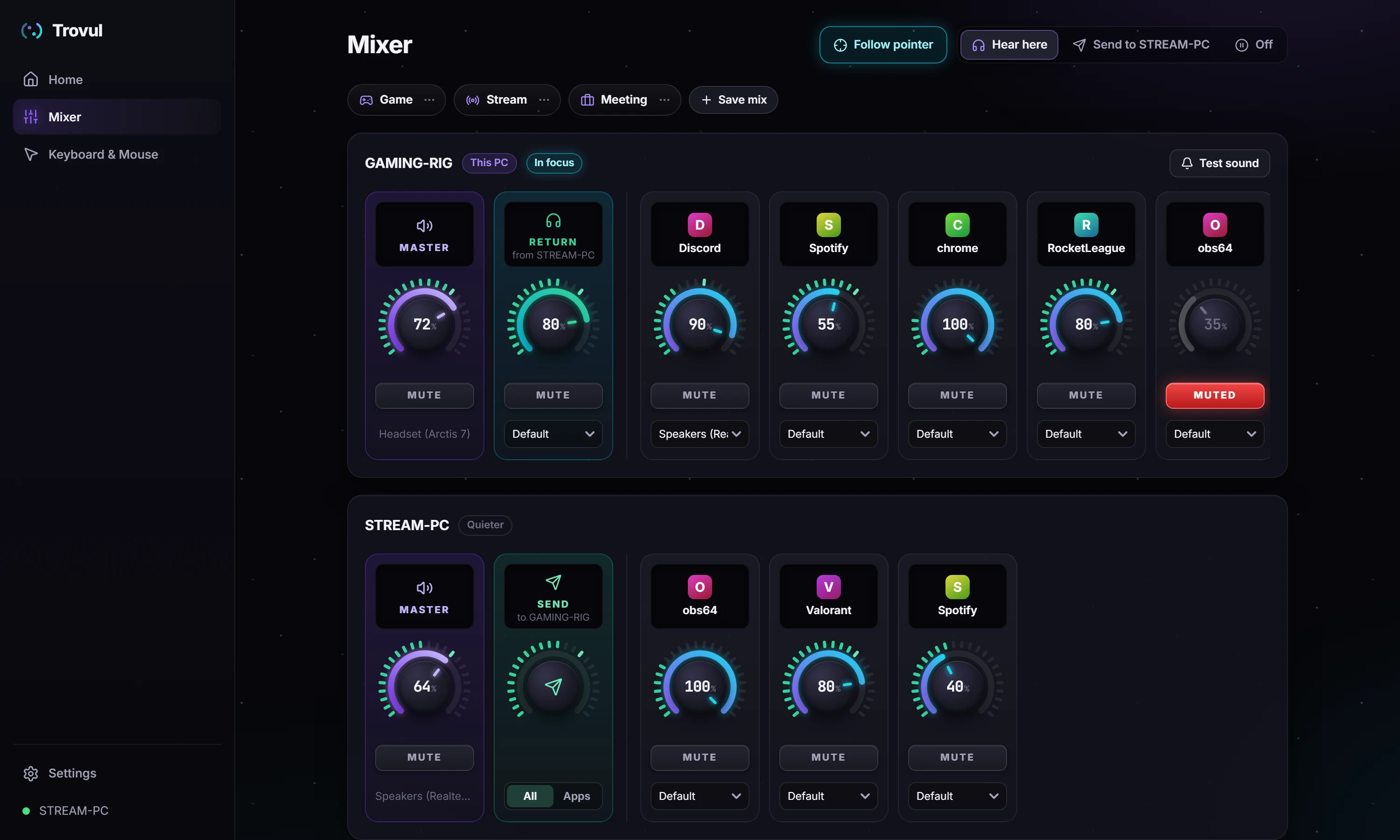
A real mixer for both PCs
Every app on both PCs gets a dial, a mute and its own output device. Save
scenes like Game, Stream and Meeting and switch everything in one click — from the app, the
tray or a Stream Deck.
Audio
Both PCs in one headset
Play the other PC's sound on this one, or send yours there. About 30 ms on a
wired network, CD-quality sound, back on its own after sleep or restarts.
GAMING-RIG
STREAM-PC
Stream mix
Your stream mix, separate from your headset
Choose which apps go to the other PC, each at its own level. Viewers hear the
game and your team — not your music. Windows 11.
Follow the pointer
The PC you're using gets louder
Move to the other PC's screen and its sound steps forward in your headset;
come back and it steps aside. Your volumes never move.
GAMING-RIG
STREAM-PC
Clipboard
Copy here, paste there
Text, images and whole folders move between the PCs. Big copies ask first and
show their progress — nothing crosses the network by surprise.
Tray
The mixer, one click away
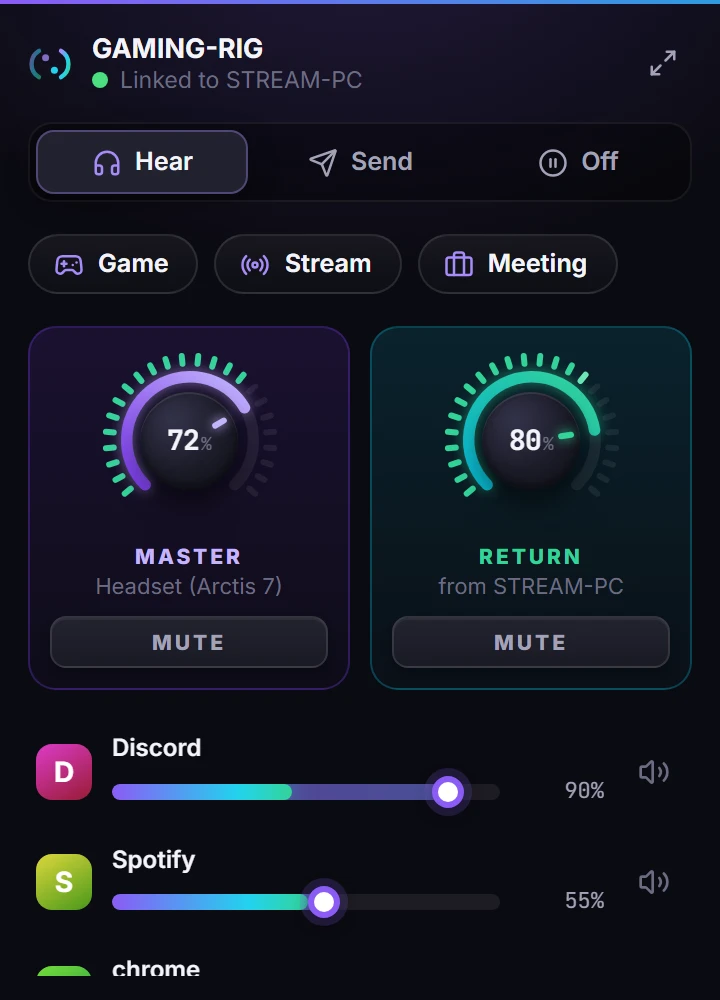
Click the tray icon for volumes, mutes and scenes without opening the app.
Small pop-ups tell you when a PC links or a file arrives.
Stream Deck
Made for Stream Deck
Keys for scenes, where the sound goes and mutes; dials for volume on
Stream Deck +. For both PCs, with nothing to configure.
GameStreamHearDiscordMusicFollow
Calls
Quiet during calls
When someone talks on Discord, Teams or Zoom, the other PC's sound steps
back — and comes back when they stop.
DISCORD
STREAM-PC
Keyboard & mouse
One keyboard and mouse for every screen
Place the other PC's screens where they really are on
your desk and just move across. Your typing goes with the pointer.
Arrange the screens by dragging them, like in Windows' display settings
Game mode keeps the pointer inside your game
Drag windows between your own monitors, even with the other PC's screen in between
Works in installers, admin windows and on the lock screen
Copy on one PC, paste on the other
Scroll Lock keeps the pointer on one PC. Ctrl+Alt+Esc always brings it home.
The film
One minute, the whole desk
The real app, recorded: linking the PCs, the mixer, the stream mix, keyboard and
mouse, the tray and Stream Deck.
Setup
Two minutes, three steps
1
Install on both PCs
A light installer for Windows 10 or 11. The firewall is set up for you.
2
Pair with one click
The PCs find each other on your network. Accept once — they reconnect on their
own from then on.
3
Use them as one
Pick where the sound goes, glide across the screens, copy and paste. That's it.
Who it's for
Built for people with two PCs on one desk
Dual-PC streamers
Game on one PC, stream from the other. One headset, one mouse, and a stream
mix your viewers will thank you for.
Gamers with a work PC
Keep Discord, music and work on the other PC and still hear everything in the
game — without alt-tabbing out.
Creators & podcasters
Route each app where it belongs and keep a clean mix, with scenes for
recording, streaming and calls.
Developers & traders
Two machines, one keyboard, one clipboard. Copy a log here, paste it there;
hear the build finish on the other PC.
Details
The details that make the difference
~30 ms
A delay you won't notice
On a wired network; 50 ms by default. On a busy Wi-Fi, Stable mode keeps the sound smooth.
Hi-Fi
The sound as it left
CD-quality sound, nothing compressed on the way to your headset.
Wi-Fi or cable
Your home network
No cable between the PCs and no adapters. Wired is best, Wi-Fi works.
100% local
Nothing goes to the internet
The PCs talk directly to each other, and only PCs you paired are accepted.
2 min
Quick to set up
Install on both PCs and pair with one click. The firewall is set up for you.
Automatic
Always reconnects
After restarts, sleep or a network drop, everything comes back on its own.
1 install
Updates itself
Update one PC and the other gets the new version by itself.
Windows
10 and 11
Light, starts with Windows and stays out of the way in the tray.
FAQ
Questions, answered
Do I need extra hardware or cables?
No. Both PCs only need to be on the same network, over Ethernet or Wi-Fi. Trovul
plays through the headset, speakers and devices you already have.
Which versions of Windows?
Windows 10 and 11, 64-bit. Sending only the apps you choose needs Windows 11 on the
PC that sends; everything else works on both.
Does my audio go over the internet?
No. The PCs talk directly to each other on your local network, and only PCs you
paired are accepted.
How much delay is there?
About 30 ms in Low mode on a wired network and 50 ms by default. On a busy Wi-Fi,
Stable mode adds a little delay and removes the dropouts. Trovul shows the live figure and
suggests the right mode.
Does it work with games?
Yes. Any app that plays sound shows up in the mixer, games included. Game mode
keeps the pointer inside a game until you leave it, and pop-ups never appear over a full-screen
game.
Does it replace Mouse Without Borders or Synergy?
For two PCs, yes: keyboard and mouse sharing, the clipboard and files are built in,
on the same link as the sound — including admin windows, UAC prompts and the lock screen.
When can I try it?
Trovul is in private testing now. Join the waitlist and you'll hear from us as soon
as early access opens.
Be among the first to try it
Trovul is in private testing. Leave your email and we'll let you know when early
access opens.